
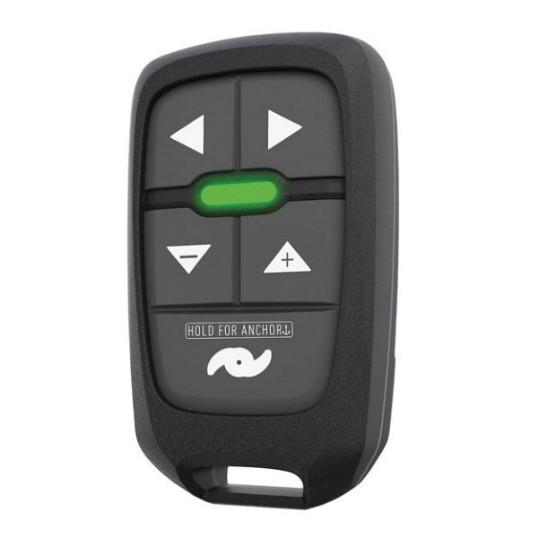

Control the Ghost trolling motor from anywhere on your boat with the Lowrance TMR-1 Remote.Set anchor and control the speed and direction of the Lowrance Ghost trolling motor from anywhere on your boat with the lightweight and easy-to-use TMR remote control.Adjust speedChange directionSet AnchorIncludes lanyardHold the plus and minus keys for 5 seconds to begin the pairing process. The light will begin to flash red. Go to your foot pedal and go to the user configuration mode. Press and hold buttons 2 and 3 until your hear a beep and the 24V and 36V lights should begin flashing. Press and hold the battery key you will hear a beep and your low, medium, and high lights will begin hyper flashing. Hold your new remote near the trolling motor and wait for the light to flash green on the remote. Press and hold the the propeller button on the bottom of the remote, the light should turn solid green. Release after the light goes dark. After the pairing process is complete hold the 2 and 3 buttons on the trolling motor until you hear a beep. The pairing process it complete.Please note you can only have 1 remote paired at a time.
LOWRANCE TMR-1 Trolling Motor Remote, Works With All Lowrance GHOST Trolling Motors
$141.00
1 in stock
1 in stock
We sell it. We install it.
Professional marine electronics installation available in South Florida. Free quotes, and boat pickup and transport for qualifying boats and projects.
- Ships from Pompano Beach, FL, United States.
- Handling: 1 business day. Delivery: 1 to 7 business days within the United States.
- Shipping is calculated at checkout by the carrier. Orders of $199 or more ship free.
- Product images and specifications are supplied by the manufacturer.
Payment Methods:
Control the Ghost trolling motor from anywhere on your boat with the Lowrance TMR-1 Remote.Set anchor and control the speed and direction of the Lowrance Ghost trolling motor from anywhere on your boat with the lightweight and easy-to-use TMR remote control.Adjust speedChange directionSet AnchorIncludes lanyardHold the plus and minus keys for 5 seconds to begin the pairing process. The light will begin to flash red. Go to your foot pedal and go to the user configuration mode. Press and hold buttons 2 and 3 until your hear a beep and the 24V and 36V lights should begin flashing. Press and hold the battery key you will hear a beep and your low, medium, and high lights will begin hyper flashing. Hold your new remote near the trolling motor and wait for the light to flash green on the remote. Press and hold the the propeller button on the bottom of the remote, the light should turn solid green. Release after the light goes dark. After the pairing process is complete hold the 2 and 3 buttons on the trolling motor until you hear a beep. The pairing process it complete.Please note you can only have 1 remote paired at a time.
| Weight | 0.44 lbs |
|---|---|
| Dimensions | 2 × 2 × 4 in |
| Compatibility | Works with all Lowrance GHOST trolling motors |
| Battery Type | Not specified |
| Operating Range | Not specified |
| Country of Origin | Not specified |
| Connector Type | Wireless |
| Warranty | Not specified |
| MFG# | 000-15468-001 |
| MFG# | TMR-1 |
Description
Specification
Overview
| Weight | 0.44 lbs |
|---|---|
| Dimensions | 2 × 2 × 4 in |
| Compatibility | Works with all Lowrance GHOST trolling motors |
| Battery Type | Not specified |
| Operating Range | Not specified |
| Country of Origin | Not specified |
| Connector Type | Wireless |
| Warranty | Not specified |
| MFG# | 000-15468-001 |
| MFG# | TMR-1 |
Customer Reviews
Reviews
Clear filtersThere are no reviews yet.


Reviews
Clear filtersThere are no reviews yet.